
The EBS Suite — Everything After the Sale
EBS Reviews
The moment after a sale, your customer gets one message with two doors: your Google review link, and a direct line to you if something went wrong.
Part of the EBS Suite — fourteen tools for everything after the sale, run from one HQ.
The Problem
Happy Customers Leave Silent. Unhappy Ones Leave Public.
A satisfied customer walks out meaning to leave a review — and almost never does. The moment passes, and the review is never written.
A dissatisfied one skips you entirely. Their first call is a public post, read by the next hundred customers before you ever hear a word.
EBS Reviews changes the order: your customer hears from you first, right after the sale, while the experience is still fresh.
How It Works
One Message. Two Doors.
Step 1
The Sale Completes
Reviews sends one message from your business — automatically, after every completed sale. Nobody has to remember to ask.
Step 2
The Customer Picks a Door
Door one is your Google review link. Door two is a direct line to you. Happy customers go public; unhappy ones come to you first, privately.
Step 3
You Watch It in HQ
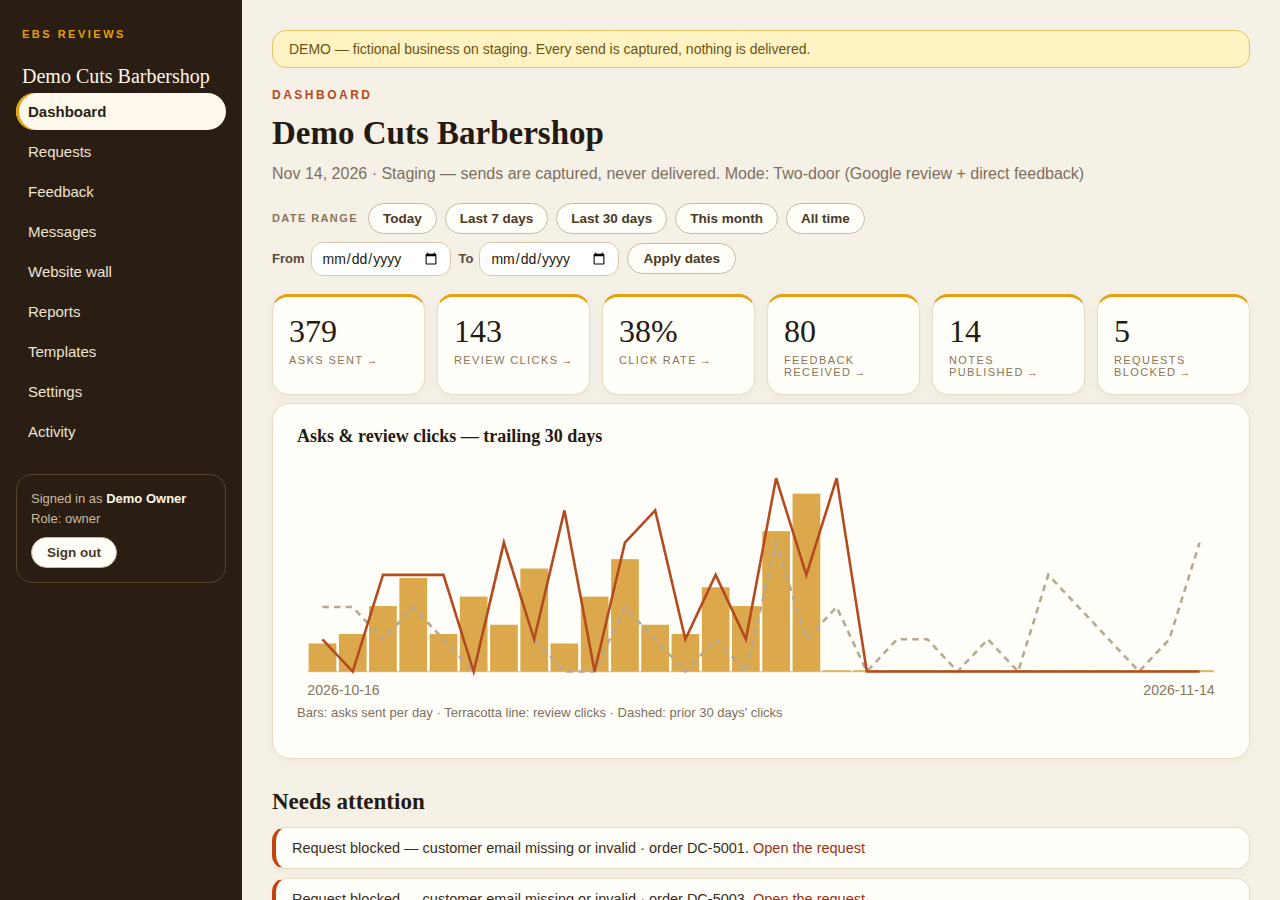
Clicks, reviews, and your rating trend on one dashboard. Private feedback lands in your inbox — publish the best of it to your website wall.
What It Does
Built for the Moment After the Sale.
Reviews and CRM are the weakest-rated corner of the Clover App Market — the featured review app rates 3.98 stars, the free CRM 3.55. EBS Reviews is built for the moment right after a sale.
Automatic Asks
A review request goes out after every completed sale — the ask never depends on a busy counter or a good memory.
Two Doors, One Message
Your Google review link, and right beside it a direct line to the owner. One message carries both, every time.
A Private Feedback Inbox
Direct feedback lands in your console inbox, not on Google. Read it, respond, and publish the best of it to your website wall.
The Numbers in HQ
Asks sent, review clicks, click rate, notes published, and your rating trend — one dashboard, no digging.
Gentle Reminders
Customers who haven't clicked get a reminder on the days you set — the follow-up happens without anyone chasing by hand.
Weekly Roll-Up
A 7-day roll-up and a 4-week table — asks, clicks, click rate, feedback — with full CSV export when you want the raw numbers.
Who It's For
Any Counter Where Reputation Decides the Next Sale.
If the next customer chooses you by what the last fifty said, Reviews is the first tool in the suite to turn on. It fits every trade EBS serves:
Pricing
Published Pricing. No Tiers, No Surprises.
EBS Reviews — $14.95/mo per location, standalone.
Included at no extra cost for EBS processing clients.
Pairs with EBS Pulse: Reviews + Pulse, $24.95/mo for both, standalone.
EBS processing: Interchange + 0.50% + a per-sale fee by average ticket — $0 under $25 · $0.05 at $25–$50 · $0.10 at $50+ · $35/mo flat.
Every suite tool is set up with you, not sold off a shelf — mapped to your counter in a free Business Review.
Questions
Asked at the Counter.
How does my customer get the ask?
Automatically. When a sale completes, EBS Reviews sends one message from your business with two doors: your Google review link, and a direct line to you if something went wrong. You set the delay — right away, or a little after the visit.
What happens when something went wrong?
The customer takes the second door instead of Google. Their note lands in your console's feedback inbox, privately, where you can read it and make it right before it becomes a public post. You can also run Reviews in feedback-only mode if you want every response to come to you first.
Where do I see my results?
In your EBS Reviews console: asks sent, review clicks, click rate, feedback received, and your rating trend on one dashboard, with a 7-day roll-up and 4-week table in Reports. Anything that needs you — a blocked request, unpublished feedback — is flagged under Needs Attention.
Can the good feedback show on my website?
Yes. Feedback you publish in the console appears on your website wall — real words from real customers, on your own site, next to the Google reviews the two-door message collects.
What does it cost?
$14.95/mo per location standalone — and for EBS processing clients the price is waived: Reviews is included at no extra cost with your processing. It also pairs with EBS Pulse at $24.95/mo for both, standalone.
Not Sure Where the Gap Is?
Not Sure Reviews Are the Gap?
Eight statements, one score, and a straight read on what to fix first — reviews, follow-up, your numbers, or your website.
Free Business Review
Everything After the Sale — Start With the Review.
Tell us what your customers say when they leave — or what they never say at all — and we will map EBS Reviews, and the rest of the suite, to your counter in a free Business Review.